What it does
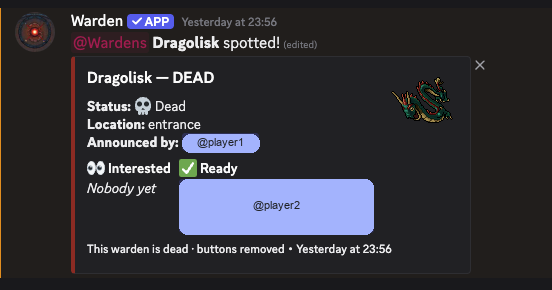
Warden announces creature finds in your Discord server with ETA, location, RSVP buttons, and an announcer leaderboard. Players can keep a per-server creature list in blacklist or whitelist mode and optionally get DMs for matching announces.
The announce autocomplete and this site’s creature list come from
TibiaWiki bestiary entries.
Rare and Very Rare creatures are left out. Existing servers keep
Message style until an admin re-runs
/warden-setup and picks Thread
(text-channel thread or forum post).
Commands
/warden-setup-
Configure where finds are announced and which role to ping (Manage Server).
Options:
channel,role, optionalstyle(Message, default, or Thread / forum post). /warden-
Announce a found creature to the configured channel.
Options:
creature(autocomplete),minutes(1–240),location, optionalimageattachment. /warden-leaderboard- Show who has announced the most wardens in this server.
On the announcement message, players can mark on my way / ready, and the announcer can mark the warden dead (that also closes the thread when announcements use Thread style). Use this site to manage your personal DM creature list per server.
Quick start
- Invite Warden and run
/warden-setupwith a channel and ping role. - Announce finds with
/warden. - Log in here to set blacklist/whitelist creatures and optional DMs.
Add the bot
Install Warden on your Discord server:
Permissions
Warden does not need Administrator. The default guild install requests:
- View Channels — read the target announce channel.
- Send Messages — post warden announcements and replies.
- Embed Links — format richer announcement messages.
- Add Reactions — support announcement interaction flow.
- Read Message History — update or inspect earlier announcement messages.
- Create Public Threads — only needed if the server uses Thread style.
- Send Messages in Threads — only needed if the server uses Thread style.
- Manage Threads — only needed if the server uses Thread style (lock the thread when marked dead).
Slash commands are installed through the applications.commands scope.
If the invite screen asks for Administrator, something is wrong and you should stop.
Support & contact
- Support server: discord.gg/szCUQsVjJ
- Contact on Discord: skywin
- Hub & news: bots.noskywin.com